A few months ago I started preparing for some cloud certifications. Like a lot of people, I didn't buy a course. I went to GitHub.
If you've never looked, it's honestly impressive what's out there. People maintain repositories with hundreds of practice questions per exam, many of them with an explanation for every single option. For free. I learned a lot from them.
But I also got annoyed with them pretty quickly.
Studying from a README
The format was the problem. A question bank on GitHub is a long Markdown file or a JSON dump. You read the question, and your eyes have already slid down to the answer. You lose your place. You have no idea which questions you got wrong last week. And there's no way to sit a "real" exam, with a timer and no peeking.
It also meant studying at my desk. That's the part that bothered me most, because the moments I actually had time and energy for practice were not at my desk. They were in the evening on the couch, or ten minutes on my phone while waiting for something.
So what I wanted was pretty modest. One question at a time. Tap an answer, check it, read why, next. An exam mode that behaves like the real thing. And something that remembers what I've seen and where I keep messing up, so I can go back and drill exactly that.
I couldn't find all of that in one free place that worked on my phone. So I built it. It's called Study Workspace.
Standing on other people's work
I didn't want to write a thousand AWS questions myself, and I didn't need to. The first courses in the app come from CloudCertPrep by Alex Santonastaso, which is MIT-licensed:
- AWS Certified AI Practitioner (AIF-C01), 408 questions across 5 domains
- AWS Certified Cloud Practitioner (CLF-C02), a little over 1,000 questions across 4 domains
Each certification becomes a course, each exam domain becomes a unit, and each course gets a final exam in the official format. For AIF-C01 that's 65 questions in 90 minutes. The app keeps track of where every imported question came from (source, commit, licence), and the attribution is right there in the course description. It felt important to do that properly.
More providers will follow. The catalog is already set up for Microsoft, Google Cloud, GitHub, HashiCorp, Kubernetes, CompTIA, Red Hat, Databricks and a bunch of others.
And here's what I'd really like to happen: other people adding their own courses. Anyone can create one, write questions or import them from a JSON file, and publish it to the public catalog. If you maintain a question bank on GitHub, it can become something people practise with on their phones. I think that's a nicer life for that content than sitting in a README.
What it does
I'll go through it the way I use it.
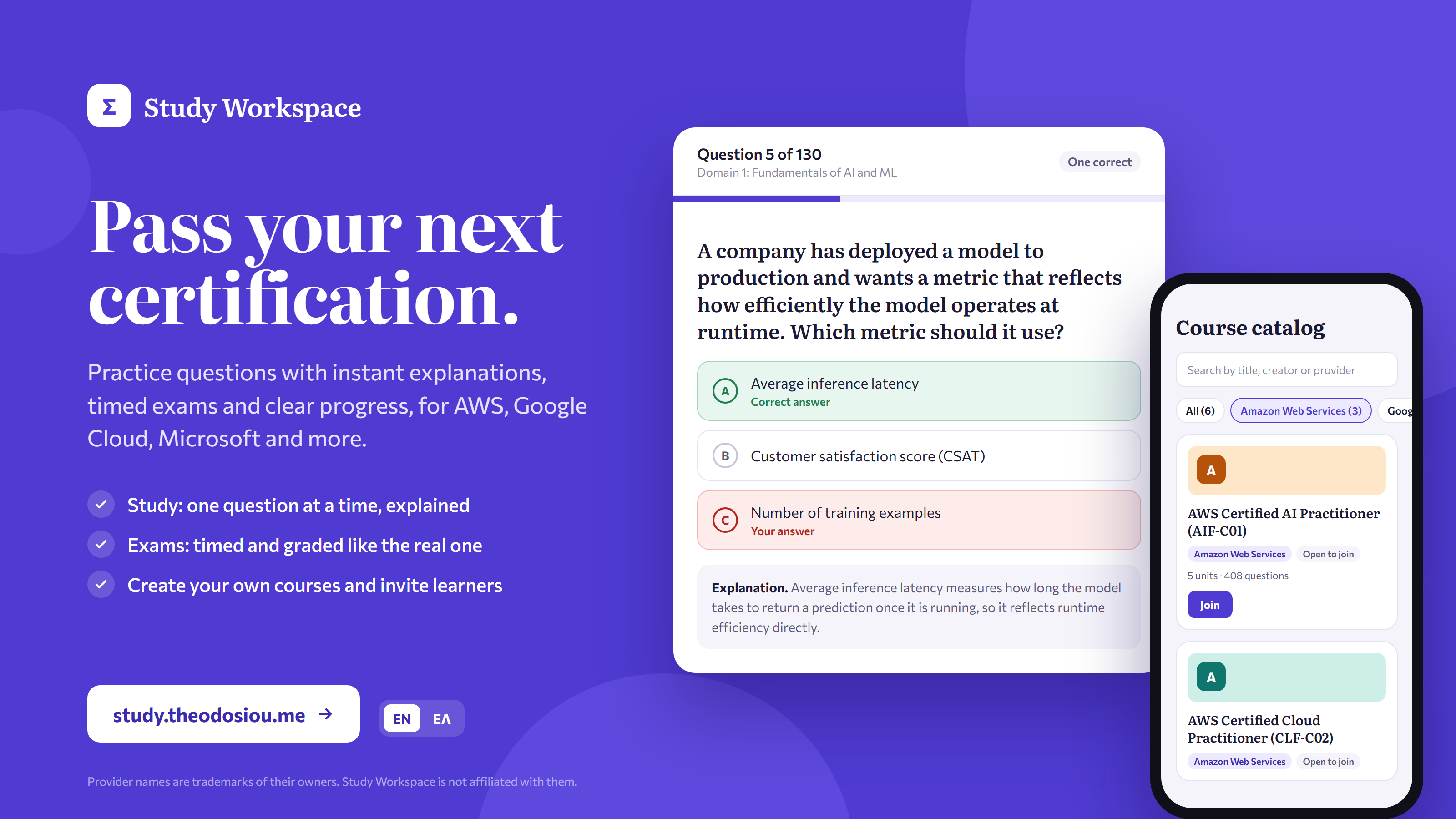
Finding something to study. There's a catalog with every public course, searchable by title, creator or provider, with filters like "Amazon Web Services (3)". The filter goes into the URL, so you can send someone a link to "all the AWS courses".
Some courses let you join straight away. Others ask the creator to approve you first. That's a choice the creator makes per course. Invitation links always work directly, which is handy if you're a teacher sharing a course with a class.
Study mode. This is the part I use the most. You get one question, pick an answer, hit "Check", and you immediately see whether you were right, plus an explanation and the reasoning for each option. There's an "I don't know" button, which sounds silly, but I like it. Guessing and getting lucky teaches you nothing, and the app treats "I don't know" as not correct.
You can practise all questions, only the ones you haven't answered yet, or only your mistakes, in order or shuffled. You can stop whenever you want. Next time, the home screen has a "Continue studying" card that drops you back exactly where you were. That's the feature that made couch studying actually work for me.
Exam mode. This one tries to feel like test day. A fixed number of random questions, a time limit, a pass mark. You don't find out what you got right until you submit. The timer runs on the server, so closing the app doesn't pause it, and if time runs out, the exam is submitted with whatever you've answered. Creators can also turn off going back to previous questions and shuffle the options. Afterwards you get your score by unit and can review every answer.
Progress. You can see how many questions you've seen, your accuracy, how many are still in your "mistakes" pile, and your exam history. Accuracy is based on your first answer to each question. Otherwise you could answer the same question ten times and feel great about a number that means nothing.
Making your own course. Courses have units, units have questions, and questions can have one or several correct answers, an optional code block, a reason per option and a general explanation. If you edit a question, it becomes a new version, so answers people already gave stay tied to the version they actually saw.
The JSON import shows you a preview and lists every problem per question before anything is saved. It's all or nothing: if one question is broken, nothing gets imported. I learned to appreciate that the first time I pasted a half-broken file.
Creators also get statistics: how many learners are active, which questions are the hardest, which wrong answer people pick most often, how exam scores are distributed. Creators can study their own courses too, and those answers just don't count in the learners' numbers.
The small things. It works on the web, on phones and on tablets. It's in English and Greek (my native language), and the choice is saved to your account. There's a dark theme. You can sign in with email or Google, and if you use both with the same email, it's the same account with the same progress.
How I approached it
I treated this like a work project, not a weekend hack. I think that's the main reason it turned out usable.
Before writing any code, I wrote a requirements document: who the users are, what "study" and "exam" mean exactly, how statistics get counted, who's allowed to publish to the public catalog (there's an admin review step), and how people join courses. I kept the first version deliberately narrow, a focused Q&A platform with no extras, and built it in phases. Each phase got reviewed before the next one started.
A few decisions I'm happy with:
- Creating and editing courses is desktop only. Writing good questions needs a keyboard and a big screen. On phones the Teach area is read-only, which is much better than a cramped editor nobody wants to use.
- The browser never gets the correct answers before you've answered. Not in study mode, not in exam mode. You can't open dev tools and cheat.
- The server owns the exam clock. There's a short grace period for answers that are already on their way, and a background job that settles exams people abandon. That way results and statistics are correct even if someone closes the tab and never comes back.
- Database migrations only ever add things. So I can always roll back a deployment without breaking the version that was running before.
I picked the stack, designed the data model and the API, set up the server, and wrote the runbooks for deploying and rolling back. I also spent more time than I'd like to admit on UI consistency across screen sizes. Buttons that don't line up with the field next to them bother me.
Under the hood
Here's the rough shape of it:
Browser / phone ── https://study.theodosiou.me ──▶ Nginx (VPS, TLS)
                                                    ├─ /      → static web app (Expo export)
                                                    └─ /api/  → NestJS API in Docker (loopback only)
                                                                └─ PostgreSQL (Supabase)
Browser / phone ── Supabase Auth (sign-in, tokens)
Frontend. Expo (SDK 58) with React Native, React Native Web and TypeScript. One codebase for web, iOS and Android, though production is the web build for now. Expo Router handles navigation, and the layout switches between a sidebar, a narrow rail and bottom tabs depending on screen width. Translations are typed: English defines every key, and if the Greek file is missing one, it doesn't compile. I like errors that show up before users see them.
Backend. NestJS with Prisma on PostgreSQL, hosted on Supabase. Supabase provides hosted Postgres and authentication; all application data is accessed through my NestJS API with Prisma. The API checks Supabase tokens against the project's public keys, so it doesn't hold any Supabase secret. Every rule, every grade and every timer lives in my API, not in the database or the client. Errors always come back in the same { code, message } shape, which makes it easy for the app to show a clear, translated message.
There's also a small import tool that turns open question banks into courses. You can run it again safely: it remembers what it imported (with a hash of each question), turns changed questions into new versions, and never overwrites something a creator edited by hand.
Tests. The end-to-end tests spin up the whole API against PGlite, which is Postgres running in memory, with every real migration applied. No shared test database, no mocks except the token check. Everything runs with Vitest, alongside type-checking and linting on both sides.
Deployment. The API is a multi-stage Docker image. The runtime image contains only the compiled app and production dependencies, and runs as a non-root user. The container is read-only, has a health check that also pings the database, and only listens on the server's loopback interface. Nginx sits in front, serves the web app and forwards /api to the container.
Each frontend release goes into its own folder named after the git commit, and going live is an atomic symlink swap. Rolling back is the same swap in reverse, which takes about a second. Deployments are documented step by step. There's also a GitHub Actions workflow that checks SSH access to the server with strict host-key verification, the first piece of automated deployment.
What's next
More certifications and providers, for a start. Then automated deployments through GitHub Actions, native iOS and Android apps, and importing a whole course (units, questions and exams) from a single file.
Try it
It's live at study.theodosiou.me. Make an account, open the catalog and try a few AWS questions from wherever you're sitting right now.
If you know a topic well, or you maintain practice questions for a certification, I'd love for you to create a course and publish it. That's how the catalog gets bigger, and how studying gets a bit easier for whoever comes next.
The code is on GitHub if you're curious, and feedback or ideas are always welcome:
Provider names are trademarks of their respective owners. Study Workspace is an independent project and isn't affiliated with or endorsed by any of them.
Found this useful? You can support my writing.
Buy me a coffee
Discussion
Comments are hosted by Giscus and GitHub. Load them when you want to read or join the discussion.